We’re pleased to announce that the version of Prism that has been in preview has now been released to the live service.
The details are described in this release notice and include the following:
Improvements to the handling of NOSTATE errors in SSO authentication
If you have any comments, questions or suggestions, you can comment here on the Prism blog, or contact our Support team directly. To suggest and discuss additional features please contact Heather Brown (csm@librarymanagementcloud.com).
We’re pleased to announce that the next release of Prism is now available for preview. This release includes the item below:
Improvements to the handling of NOSTATE errors in SSO authentication
When a NOSTATE error occurs in SSO authentication, a re-direction to the account page now takes place.
Release procedure
Please review the preview version as early as possible, to familiarise yourself with the new functionality. Other functionality, extensions and styling will be unaffected by this change.
It is necessary to use the prism-demo.librarymanagementcloud.co.uk/{your tenancy name} URL to preview a release, even if you have your own host name for the live service.
Release to the live service
Prism will be released to the live service on Thursday 11th April 2024.
Comments and contact
Please get in touch if you have any comments, questions or suggestions. You can comment here on the Prism blog, or contact our support team directly. To suggest and discuss additional features please contact Heather Brown (csm@librarymanagementcloud.com).
We’re pleased to announce that the version of Prism that has been in preview has now been released to the live service.
The details are described in this release notice and include the following:
PIN reset in Prism for borrowers without an email address
If you have any comments, questions or suggestions, you can comment here on the Prism blog, or contact our Support team directly. To suggest and discuss additional features please contact Heather Brown (csm@librarymanagementcloud.com).
We’re pleased to announce that the next release of Prism is now available for preview. This release includes the items below:
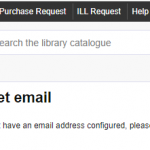
PIN reset in Prism for borrowers without an email address
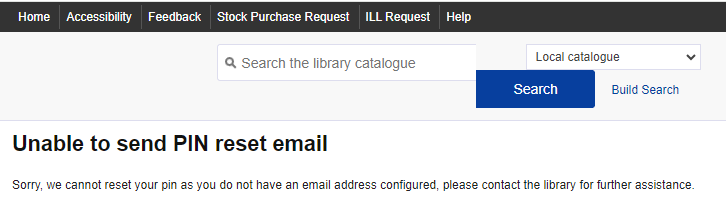
If a borrower without an email address clicks on Reset your PIN and enters their barcode, the system will now show the following message: ’Sorry, we cannot reset your pin as you do not have an email address configured, please contact the library for further assistance’.
Release procedure
Please review the preview version as early as possible, to familiarise yourself with the new functionality. Other functionality, extensions and styling will be unaffected by this change.
It is necessary to use the prism-demo.librarymanagementcloud.co.uk/{your tenancy name} URL to preview a release, even if you have your own host name for the live service.
Release to the live service
Prism will be released to the live service on Tuesday 6th February 2024.
Comments and contact
Please get in touch if you have any comments, questions or suggestions. You can comment here on the Prism blog, or contact our support team directly. To suggest and discuss additional features please contact Heather Brown (csm@librarymanagementcloud.com).
We’re pleased to announce that the version of Prism that has been in preview has now been released to the live service.
The details are described in this release notice and include the following:
- Improved handling of records with special characters in Prism
- Security update to JavaScript (jQuery), used by dynamic web pages in Prism
If you have any comments, questions or suggestions, you can comment here on the Prism blog, on Prism Ideas or contact our support team directly.
We’re pleased to announce that the next release of Prism is now available for preview. This release includes the items below:
- Improved handling of records with special characters in Prism
- Security update to JavaScript (jQuery), used by dynamic web pages in Prism
Improved handling of records with special characters in Prism
Previously special characters in records could cause problems with the full record display in Prism. Changes have been made to improve the handling of these to resolve this.
Security update to JavaScript (jQuery), used by dynamic web pages in Prism
Please preview this release in your Prism Sandbox as soon as possible to check that on-screen functionality, extensions and styling still work as expected.
Release procedure
Please review the preview version as early as possible, to familiarise yourself with the new functionality and to check that the existing functionality, extensions and styling still work as expected.
It is necessary to use the prism-demo.librarymanagementcloud.co.uk/{your tenancy name} URL to preview a release, even if you have your own host name for the live service.
Release to the live service
Prism will be released to the live service on Tuesday 12th December 2023.
Comments and contact
Please get in touch if you have any comments, questions or suggestions. You can comment here on the Prism blog, or contact our support team directly. Please visit the Prism Ideas Forum to suggest and discuss additional features.
We’re pleased to announce that the version of Prism that has been in preview has now been released to the live service.
The details are described in this release notice and include the following:
Darker border on the PIN reset field when viewed on mobile devices
If you have any comments, questions or suggestions, you can comment here on the Prism blog, on Prism Ideas or contact our support team directly.
We’re pleased to announce that the next release of Prism is now available for preview. This release includes the item below:
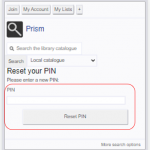
Darker border on the PIN reset field when viewed on mobile devices
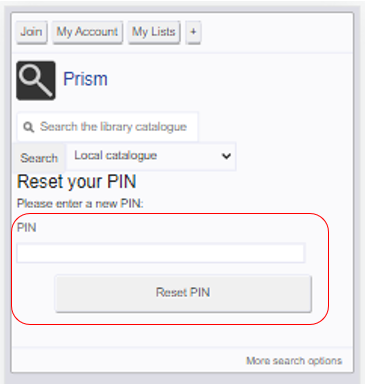
Now when someone resets their PIN using a mobile device, the border is clearer on the PIN field.
Release Procedure
Making the most of your preview
Please review the preview version as early as possible, to familiarise yourself with the new functionality and to check that the existing functionality, extensions and styling still work as expected.
It is necessary to use the prism-demo.librarymanagementcloud.co.uk/{your tenancy name} URL to preview a release, even if you have your own host name for the live service.
Release to the live service
Prism will be released to the live service on Tuesday 26th September 2023
Comments and contact
Please get in touch if you have any comments, questions or suggestions. You can comment here on the Prism blog, or contact our support team directly. Please visit the Prism Ideas Forum to suggest and discuss additional features.
We’re pleased to announce that the version of Prism that has been in preview has now been released to the live service.
The details are described in this release notice and include the following:
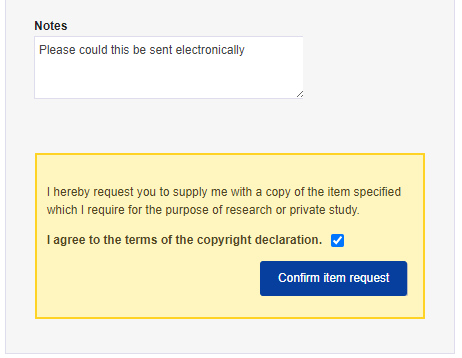
- ILL Prism Pro Notes field details are now only recorded in the ILL request
If you have any comments, questions or suggestions, you can comment here on the Prism blog, on Prism Ideas or contact our support team directly.
We’re pleased to announce that the next release of Prism is now available for preview. This release includes the item below:
- ILL Prism Pro Notes field details are now only recorded in the ILL request
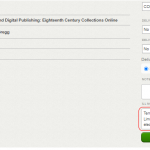
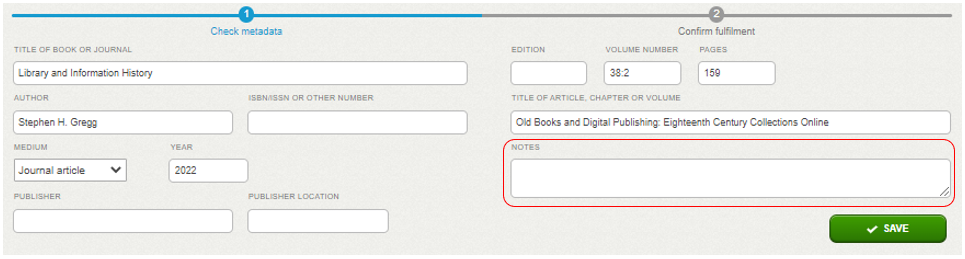
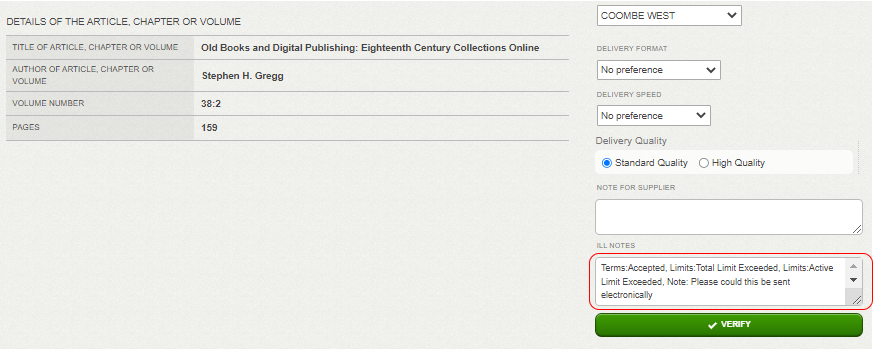
Previously, details entered in the Notes field on the ILL Prism Pro form were recorded in the 599 field in the bib record. This is no longer the case:
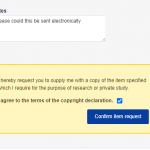
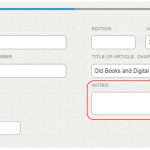
They are now only recorded in the ILL request:
Release Procedure
Making the most of your preview
Please review the preview version as early as possible, to familiarise yourself with the new functionality. Other functionality, extensions and styling will be unaffected by this change.
It is necessary to use the prism-demo.librarymanagementcloud.co.uk/{your tenancy name} URL to preview a release, even if you have your own host name for the live service.
Release to the live service
Prism will be released to the live service on Tuesday 25th April 2023.
Comments and contact
Please get in touch if you have any comments, questions or suggestions. You can comment here on the Prism blog, or contact our support team directly. Please visit the Prism Ideas Forum to suggest and discuss additional features.


Recent Comments