Prism Blog

Archive for the 'Roadmap' Category

Watch the latest Prism Development webinar

If you were unable to attend one of our recent Prism 3 update webinars, then catch up on latest developments by watching the recording below or by downloading the video.

Agenda

  • Prism Roadmap overview
  • Summary of the last Prism release, with a look at Admin Console changes, and ratings
  • Next steps on the roadmap
    • List sharing
    • Fix to title handler for semicolon
    • Development of ‘is reservable’ for context sensitive button
    • Augmented discovery
    • Domain name change
  • Enabling the Mobile interface
 

Watch the latest Prism Development webinar

If you were unable to attend one of our recent Prism 3 update webinars, then catch up on latest developments by watching the recording below or by downloading the video.

Agenda

  • Prism Roadmap Autumn 2011 overview
  • Summary of the last Prism release
  • Recap of developments in 2011 – a review of key features released this year
  • Roadmap next steps: demos of work in progress
 

Watch the latest Talis Prism Development webinar

If you were unable to attend one of our recent Prism 3 update webinars, then catch up on latest developments by watching the recording below or by downloading the video.

Agenda

  • Introductions
  • Roadmap
  • General update
    • Latest release
      • Add to list
      • Export to citation tools
      • Classmark searching (class:””)
      • More SDM work (title and identifiers)
      • Choice of jacket supplier
    • Upcoming plans
      • Date ranges
      • Search results page
      • Augmented discovery
      • Mobile theme
    • Design documentation
    • MarcGrab/LDS rollout
 

Prism 3: Development Update Webinar

To keep up to date with the latest Prism 3 Developments you can register for the free webinar on Monday 23rd May 2011 at 12:30 for Public Libraries and 14:00 for Academic Libraries

Public libraries click here to register.

Academic libraries click here to register.

This webinar will focus again on discussing the latest Prism 3 developments referring to the Prism 3 Roadmap, while providing an opportunity for you to raise any specific questions that you may have.

In the meantime keep up with the latest Prism 3 news and developments on the Prism 3 website and blog.

Talis Prism 3: Development Update Webinar

To keep up to date with the latest Talis Prism 3 Developments you can register for the free webinar on Monday 18th April 2011 at 12:30 for Public Libraries and 14:00 for Academic Libraries

Public libraries click here to register.

Academic libraries click here to register.

This webinar will focus again on discussing the latest Talis Prism 3 developments referring to the Talis Prism 3 Roadmap, while providing an opportunity for you to raise any specific questions that you may have.

In the meantime keep up with the latest Talis Prism 3 news and developments on the Talis Prism 3 website and blog.

Talis Prism 3 Roadmap updated

We have updated the Talis Prism 3 Roadmap to reflect further plans for development. As usual, the Roadmap will be a reference point in the next Talis Prism 3 Development Update Webinar, which is scheduled  for Monday 21st March 2011 at 12:30 for Public Libraries and 14:00 for Academic Libraries. Please follow the link for details on how to register.

Watch the latest Talis Prism Development webinar

If you were unable to attend one of our recent Prism 3 update webinars, then catch up on latest developments by watching the recording below or by downloading the video.

The agenda for this webinar was:

  • Roadmap
  • General update
  • Admin console
  • Talis Library Ideas
  • Next release
  • Semantic Data Model
  • Questions
 

Prism 3 Release Preview – 11 February 2011

We’re pleased to announce that we’ve just released the latest version of Talis Prism 3 for everyone to preview. This is a big release with lots of great new features, the most notable are:

  • View loan history (beta)
  • “My Account” redesign
  • Choice of jacket image supplier
  • Linked data API
  • New breadcrumb trail
  • Display of “in transit” items
  • An alternative to “no image available”

We’ve also undertaken some “under the bonnet” work to support a lot of exciting developments we’ve got planned for the next year and beyond.

This release also contains some other changes and a small fix:

  • Additional fields included on the feedback page
  • Year facet is now sorted in descending order
  • Fix for a bug in the facet system where values with no corresponding results in a search were being displayed

My Account/View Loan History

The most visible change in this release is the “My Account” redesign that Matt blogged about in December. The new design splits different pieces of data into their own sections and simplifies some of the most common workflows we’ve identified analysing log files. A very common operation is renewing all loans, which is now possible in a single click with the “Renew all” button.

We’ve also looked at the data displayed to users and made a few tweaks, including humanised dates and displaying ILL statuses as text descriptions rather than code numbers.

A new section has been added to allow users to view a history of their past loans; these can be paged through and sorted by title, author or date borrowed. We’ve also added book jackets to serve as a visual “aide memoire” when browsing the list.

Developing Loan History has required a new release of “Local Data Services” (LDS) so we’re going to BETA test it with a handful of customers to ensure everything is working before performing a full rollout. Once the new version of LDS goes to general release and your system is upgraded, Prism 3 will start showing the “Loan History” tab.

Choice of jacket image supplier/Alternative to “no image available”

To increase the coverage for jacket images, we’ve been talking with several providers to augment the current offering. We’re in the final stages of these conversations at the moment and as soon as they are concluded we can enable them with the work we’ve undertaken.

In tandem with this effort, we devoted effort to an idea posted by City of London libraries on Talis Library Ideas: An alternative to the default “No Image Available”. It’s now possible to upload your own images that will be displayed if no cover image can be found. These need to be a particular size and named in a certain way so that we can detect that you’ve uploaded them:

The files should be named

no-image-small.[ext]

and

no-image-medium.[ext]

where [ext] is one of gif, png or jpg, e.g. no-image-small.jpg. We suggest keeping the size of the small image at 75×100 pixels, and the medium at 150×200 pixels.

These files can then be uploaded using the Talis Admin Console.

Linked data API

Allowing greater access to the curated data in your catalogues was a central reason for developing the Linked Data API and with this release you can now surface search results and item pages in a variety of machine-readable formats. The API will also allow richer extensions that are able to tap into more of the underlying data that drives Prism 3.

To view search results as RSS 1.0, you need to add .rss to the end of “/items”, e.g.:

http://prism.talis.com/demo/leicestershire/items.rss?query=Lost+Symbol

Any search can be surfaced in this way, so you could provide RSS feeds of new releases in particular genres; your users can then subscribe to these, allowing them to be informed when something they may be interested in borrowing becomes available.

The RSS icon now also appears in the browser address bar on every search results page; users can click this to capture their search as an RSS feed, allowing them to monitor updates to those results.

The RSS icon in Firefox

The RSS icon in Firefox

The RSS icon in Internet Explorer

The RSS icon in Internet Explorer (lower right hand side of image)

To fetch the details of a particular item in a variety of formats you just append the output type after the local control number, e.g.:

http://prism.talis.com/demo/southwark/items/638126.rdf

The supported output formats are: RDF/XML (.rdf), JSON (.json), N-Triples (.nt) and Turtle (.ttl).

Display of “in transit” items

Another Talis Library Ideas suggestion that we’ve completed for this release is flagging up when an item is in transit/between locations. This feature is also reliant on the new version of LDS, so will also be tested by a small group of libraries before going to general release.

New breadcrumb trail

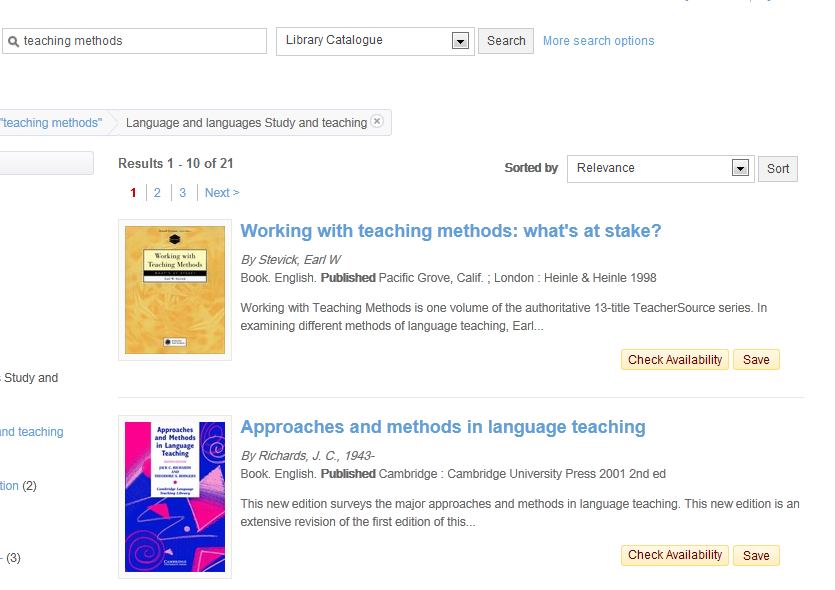
At a Prism 3 user day last year, the University of Derby mentioned that it would be useful if individual facets could be removed from a search in progress, without having to go back several steps. We set about looking at different ways to present this option to users and settled on a brand new breadcrumb trail for Prism 3.

The new trail has small remove buttons after each element, clicking it will rerun the search without that particular constraint included – allowing users to “open up” their search if they haven’t found exactly what they were looking for.

This is a substantial release so we’d appreciate it if you could take some time to cast an eye over your tenancy and familiarise yourself with the changes we’ve made.

You can access the preview by placing “/demo/” after the prism.talis.com part of your URL, e.g. http://prism.talis.com/demo/leicestershire/.

If you have questions on this or any other issue, please feel free to email me phil.john@talis.com or your Account Manager (or comment here, of course).

Talis Prism 3: Development Update Webinar

To keep up to date with the latest Talis Prism 3 Developments you can register for the free webinar on Monday 7th February 2011 at 12:30 for Public Libraries and 14:00 for Academic Libraries

Public libraries click here to register.

Academic libraries click here to register.

This webinar will focus again on discussing the latest Talis Prism 3 developments referring to the Talis Prism 3 Roadmap, while providing an opportunity for you to raise any specific questions that you may have.

In the meantime keep up with the latest Talis Prism 3 news and developments on the Talis Prism 3 website and blog.

Watch the latest Talis Prism Development webinar

If you were unable to attend one of our recent Prism 3 update webinars, then catch up on latest developments by watching the recording below or by downloading the video. The main topics covered were:

  • Introductions
  • Roadmap
  • General Update
    • Next release:
    • Admin Console
    • Talis Library Ideas
    • SDM
    • Roadmap next steps
      • 20% Dev time for ideas forum ideas
      • Planning for “augmented discovery”
      • Improvements to advanced search
      • Questions

The next webinar will be on Monday 23rd August, details will be posted on the Talis Prism blog shortly.